


MyUPMC
4.33.46K Reviews
App Specs
- Version
- 3.28.1
- Updated On
- License
- Free
- Downloads
- 500,000+
- Developer
- UPMC
- Categories
- Medical
- Platform
- Android, iOS
Screenshots
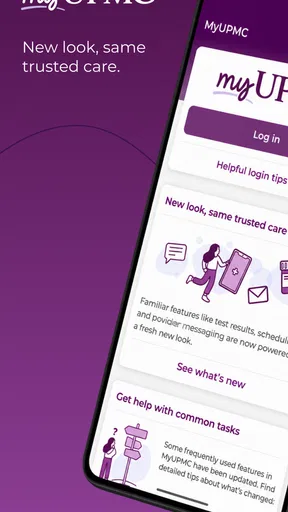
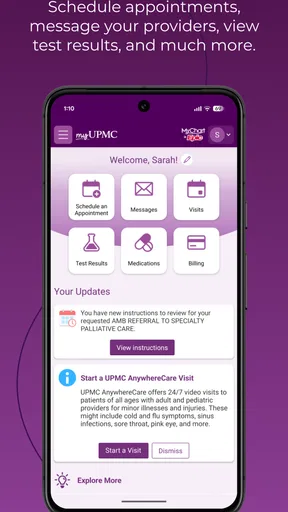
 Analysis by AppCompare
I find MyUPMC most useful when I treat it as a place to organize care, not as a substitute for speaking with a clinician. It brings common health-management tasks onto a phone, which can save time when I need to check an appointment or prepare for a conversation with my care team. Whether it feels straightforward, though, depends on how comfortable you are with online accounts and on how much of your care is connected to UPMC.
Readability and finding your way around
For everyday use, clear labels and a dashboard matter more than a long feature list. MyUPMC presents appointments, results, and provider messages in one place, so I can start with the task at hand rather than hunt through unrelated menus. That layout is helpful when I am checking something quickly, but it is worth taking a few minutes to explore when I am not in a hurry. Learning where records and medication details sit can make a stressful visit easier to manage later.
There is also a practical distinction between seeing information and understanding it. A test result appearing in an app can help me keep track of what has arrived, but it does not automatically explain what it means for my health. I would use the result as a prompt for a clinician conversation, especially if the wording is unfamiliar or the result worries me, rather than treating a screen as a diagnosis.
Getting Started with MyUPMC
First off, downloading MyUPMC is a breeze. You can snag it from either the App Store or Google Play, and it doesn’t take up much space on your phone. Once installed, logging in is simple. Just use your UPMC account credentials, and you’re good to go. If you don’t have an account, don’t worry! Signing up is straightforward, and the app guides you through each step.
Once you’re in, the interface is clean and intuitive. Everything is clearly labeled, so you won’t find yourself clicking around aimlessly. The dashboard gives you a quick overview of your upcoming appointments, recent test results, and any messages from your healthcare providers.
Features That Make Life Easier
One of my favorite aspects of MyUPMC is the appointment scheduling. Instead of playing phone tag with your doctor’s office, you can book, reschedule, or cancel appointments with just a few taps. It’s a real time-saver, especially for those of us with busy schedules.
The app also keeps you connected with your healthcare team through a secure messaging feature. Whether you have a quick question about your medication or need to discuss your symptoms, you can send a message directly to your doctor. It’s like having a direct line to your healthcare provider without the hassle of long phone holds.
Worth Reading Before You Choose

EA SPORTS FC Mobile 26 Is a Bigger Football Game, but It Takes Time

Flipboard Shows What News Apps Must Do Beyond the Feed

Switching to Android Auto Means Rethinking Your Driving Routine

Google Calendar Makes a Crowded Week Easier to Manage

Ludo King Makes the Most of the Minutes Between Plans

Baby Panda World Brings Quick Play to Modern Phones, but Its Game Library Feels Busy
Another standout feature is the access to your medical records. You can view your test results as soon as they’re available, which is great for those who like to stay informed about their health. Plus, you can easily share these records with other healthcare providers if needed. No more scrambling to find paperwork before your appointments!
Making appointments and messages work for you
Scheduling online is most valuable when the need is routine and the available appointment options suit your situation. I would use it to arrange a check-in or move a visit that can safely wait, then call the office if I needed help choosing the right type of appointment or explaining a time-sensitive concern. A convenient booking screen cannot judge urgency, so I would not let the ease of tapping through it delay urgent care.
Messaging is a better fit for questions that can wait for a reply, such as clarifying a nonurgent instruction or asking what to bring to a visit. I would include the relevant context in the first message—what I am asking about and which appointment or medication it concerns—so the care team has a clearer starting point. For sudden or severe symptoms, a message is the wrong channel; I would use the appropriate urgent or emergency service instead.
Prescription Management and More
Prescription management is another area where MyUPMC shines. You can request refills directly through the app, and it even sends reminders when it’s time to take your medication. For someone like me who tends to forget, these reminders are a lifesaver.
Additionally, the app provides a comprehensive list of your current medications, dosages, and instructions. This is super handy if you’re visiting a new doctor and need to provide them with your medication history. Everything you need is right at your fingertips.
Motor and sensory considerations
Phone-based health management can reduce the effort of making calls, traveling with paperwork, or repeating a medication list from memory. That is a meaningful convenience for someone juggling several prescriptions or appointments. At the same time, any app requires navigating a screen, entering information, and keeping track of account access. If small touch targets, typing, or reading on a phone are difficult, a phone call or help from a trusted person may be more comfortable for some tasks.
I would also avoid trying to read detailed medical information while distracted or in a noisy place. A quiet moment makes it easier to distinguish a result from a message or appointment detail and to write down questions. If notifications or reminders are useful, they can support a routine, but they should not be the only method for remembering medication: a person may miss an alert, change phones, or simply not have the app open when needed.
Situational access and practical trade-offs
A realistic use case is getting ready for a primary-care visit during a busy week. I can check the appointment, look over the medication list, and note a question while there is still time to contact the office. If I need to share records with another provider, having them available can reduce the last-minute search through folders. The useful habit is to check details before leaving, rather than assuming a phone screen will solve every issue at the appointment.
Compared with a paper calendar and a folder of printed records, MyUPMC puts several kinds of information together and can make updates easier to manage. Compared with calling the office, it offers a self-service route for tasks that are available in the app, but a call remains better when the request is unusual or needs a conversation. And compared with a general health-tracking app, its value is tied to managing care through UPMC rather than serving as a universal home for every provider or health record.
That distinction also helps answer who should consider it. It is a natural fit for UPMC patients who want to handle appointments, messages, records, and prescriptions in one place. Someone whose clinicians are outside that system, or who prefers not to manage healthcare through a smartphone, may get more from direct calls and the tools already used by their providers. The app is free and rated for Everyone; its usefulness still depends on whether it matches your care setup and habits.
What to expect when something does not go smoothly
Digital access can make routine administration easier, but it does not remove every point of friction. First-time account setup and remembering credentials can interrupt an otherwise quick task. I would get access sorted out before an appointment or refill becomes urgent, and keep the office’s phone number available as a backup. If a record or appointment detail looks unclear, checking with the provider is safer than assuming the app display tells the whole story.
It is also sensible to think about privacy in ordinary, practical terms. A phone may be shared, left unlocked, or used in a public place, so I would be careful about who can see health information on the screen. That is not a reason to avoid the app; it is a reminder that medical details deserve the same attention as other personal information.
What’s the Verdict?
All in all, MyUPMC is a solid app for managing your healthcare needs. It’s user-friendly, efficient, and packed with features that genuinely make life easier. From scheduling appointments to managing prescriptions, it’s like having a healthcare assistant in your pocket.
While it’s primarily designed for UPMC patients, even those who aren’t part of the network might find the medical records and appointment management features beneficial. It’s clear that a lot of thought has gone into making this app as helpful as possible, and it shows.
So, if you’re looking for a way to streamline your healthcare management, give MyUPMC a try. It’s free to download, and you might just find it becomes an essential part of your daily routine. Trust me, your future self will thank you!
Who I would recommend it to
UPMC patients who want a convenient way to keep routine care organized are the people I would point toward MyUPMC first. Its mix of appointment tools, records, messages, and medication information can be especially useful when care involves several small tasks that are easy to forget. UPMC, the app’s developer, has built a medical tool rather than a general wellness tracker, and that focus is both its strength and its boundary.
Across the app stores, it has an average rating of 4.3 from around 26,000 ratings, with roughly 3,400 written reviews and over 500,000 installs. It is free, and its current version is 3.27.0; the app first appeared on July 21, 2018. Those figures suggest that it is an established option, but they do not tell me whether it will suit someone’s individual needs. I would judge it by whether the UPMC services I use are easier to manage from my phone.
For an inclusive experience, the clearest advantage is having several care tasks gathered in one place, while the main caveat is that a phone interface will not suit every person or every moment. I would use MyUPMC for organization and routine communication, keep a phone-based alternative for complicated questions, and involve a trusted helper when navigating the screen or account becomes a burden. That balance makes it a useful companion for the right patient without asking it to replace the human support that healthcare sometimes needs.
Pros
- User-friendly interface simplifies navigation.
- Secure messaging with healthcare providers.
- Easy access to test results and medical history.
- Appointment scheduling is straightforward.
- Integrated billing and payment options.
Cons
- Limited features without a UPMC account.
- Occasional login issues reported by users.
- Some features require internet access.
- Notifications can be inconsistent at times.
- Not all medical records are available instantly.
FAQs for MyUPMC
What is MyUPMC and what features does it offer?
MyUPMC is a comprehensive health management app designed to provide seamless access to your healthcare information. It offers features such as appointment scheduling, access to medical records, prescription refills, and direct messaging with your healthcare providers. The app aims to enhance patient engagement by making healthcare management more convenient and efficient.
Is MyUPMC available for both Android and iOS devices?
Yes, MyUPMC is available for download on both Android and iOS platforms. The app is designed to be user-friendly and compatible with a wide range of devices, ensuring that patients can easily access their healthcare information and services, regardless of their preferred mobile operating system.
How secure is my personal health information on MyUPMC?
MyUPMC prioritizes the security and privacy of your personal health information. The app employs advanced encryption methods and complies with all relevant health privacy regulations, such as HIPAA. Users can trust that their data is protected and only accessible to authorized personnel and themselves.
Can I manage multiple family members' health information with MyUPMC?
Yes, MyUPMC allows users to manage the health information of multiple family members through a single account. This feature is particularly useful for parents managing their children's healthcare or caregivers assisting elderly family members. Users can easily switch between profiles to access the necessary information.
What should I do if I encounter technical issues with MyUPMC?
If you experience any technical issues while using MyUPMC, you can contact their customer support team for assistance. Support is available via phone, email, or through the app itself. Additionally, the app's website offers a comprehensive FAQ section to help troubleshoot common problems.


